
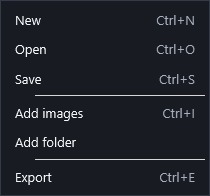
When trying adjustments, press F5 to recalculate without returning to the menu. Save your work with Ctrl+S and export with Ctrl+E. Before using the latter, check the active module: it exports an image in Trails, or a video in Timelapse with several photographs.
For numeric input:
- Type a value and press Enter to confirm it.
- Press Escape to abandon the entry and restore the previous value.
- If a slider has a default, double-click its bar to restore it. Other controls stay as they were.
Shortcut list
| Shortcut | Action |
|---|---|
| F1 | Open the user guide in the interface language. |
| Ctrl + N | New project. |
| Ctrl + O | Open project. |
| Ctrl + S | Save project. |
| Ctrl + Z | Undo the latest project change. |
| Ctrl + I | Add images. |
| F5 | Stack in Trails; generate preview in Timelapse. |
| Ctrl + E | Export image in Trails; MP4 in Timelapse. |
| Enter / Space in the viewer | Toggle fit and actual size. |
| Enter / Escape in numeric entry | Confirm / restore the previous value. |
 Enlarge screenshot ↗