
StarTrail Studio runs on 64-bit Windows 11. The installer includes .NET, and you can work offline as long as your photographs are on an accessible drive.
For your first attempt, try a few photos before loading a whole night's shooting. Allow room for the results: a sequence of hundreds of TIFF files takes considerably more space than an MP4.
Install the app and open the guide
- Run StarTrailStudio-0.1.0-Setup.exe.
- Choose Spanish or English and accept the Windows permission prompt.
- Choose an installation folder. You can also create a desktop shortcut and register .stproj projects in Open with. Registration does not replace a default app you already chose in Windows.
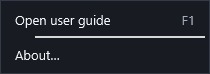
Open the guide from the Start menu, Help → Open user guide, or F1. The app opens the interface language; the Start menu opens the language chosen during installation. You can read it offline and print the current page or save it as PDF in your browser. When copying it to another computer, take the whole folder so images and links still work.
- Update: keep a copy of your projects, close StarTrail Studio and run the new installer in the same location.
- Uninstall: use Windows Settings → Apps → Installed apps. Your photos, projects, exports and personal data are kept.
Before loading a whole night's photographs, consider their resolution and the effects you plan to use: both influence memory requirements. Start with 16 GB of RAM; 32 GB provides more headroom for roughly 46 MP photographs. You will also need free disk space for outputs, sequences and temporary files, so there is no single photograph count that can be guaranteed for every computer.
 Enlarge screenshot ↗
 Enlarge screenshot ↗